
NOVA Community
ENSAPIA CorporationSocial
3.93.00 Reviews
- Version
- 1.2.3
- Installs
- 10.00K
- Age Rating
- Teen
Screenshots
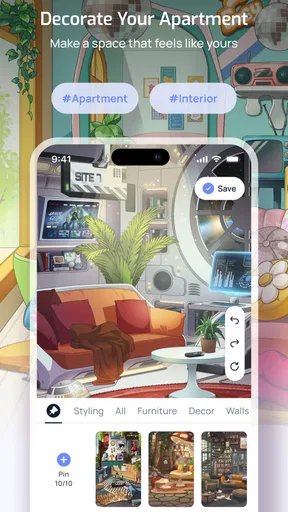
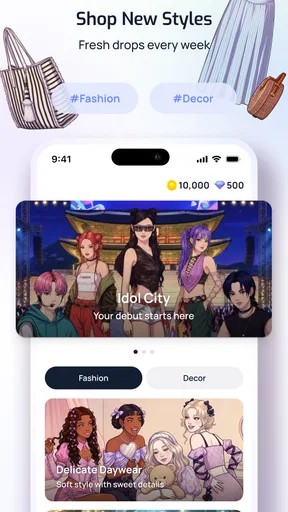
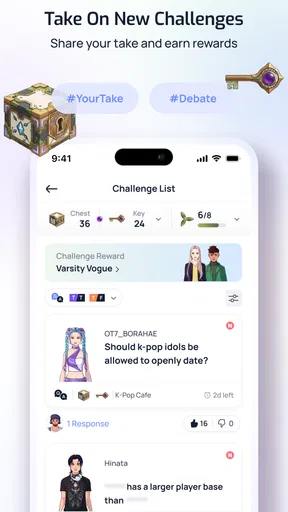
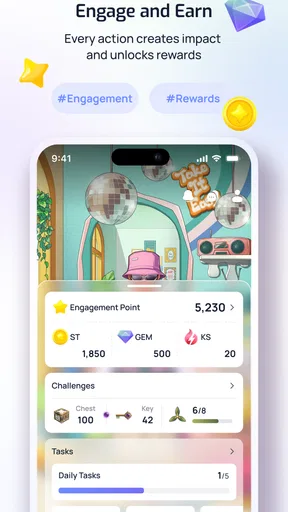
Our Review of NOVA Community
 Analysis by Appyee
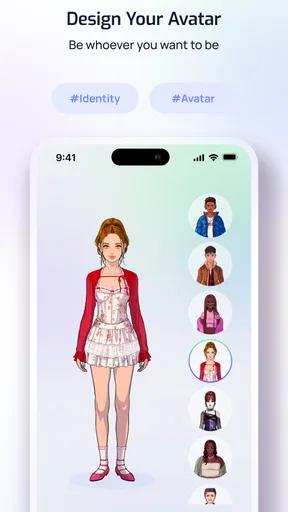
I approached NOVA Community as a social app for people who want a more expressive way to participate online. Its full name, NOVAverse: Nexus of Voices & Avatars, points toward a space built around voices and avatars rather than a simple stream of text updates. That distinction matters: this is not something I would install expecting the same experience as a conventional messaging app or a familiar photo feed. I would choose it when I want identity and conversation to feel more visible and personal.
The app comes from ENSAPIA Corporation and is free to install, with optional purchases ranging from $1.99 to $49.99 per item. It is aimed at Teen users, runs on Android 8.0 or later, and the current version is 1.2.3. Those details make it reasonably accessible for people using older Android phones, although the presence of purchases means I would still take a moment to understand what is optional before spending anything.
After using it, my main advice is simple: give yourself a little time to understand the social environment before judging it. The first useful result is not necessarily finding a large audience immediately. It is getting your identity set up clearly enough that another person can recognize what you are about and decide whether to interact. The best way to approach NOVA Community is as a place to build a comfortable social presence, not as a guaranteed source of instant attention.
What to expect from this avatar-focused social space
The central idea feels more character-driven than the usual social timeline. In ordinary social apps, your profile picture, handle, and written posts do most of the work. Here, the emphasis on avatars suggests that how you present yourself is part of the conversation. That can be appealing if you enjoy adjusting a digital identity, joining discussions through a recognizable persona, or expressing yourself in a way that is less tied to your everyday appearance.
I would not compare it directly with a private messenger. A messenger is usually about reaching people you already know quickly, while NOVA Community is better suited to discovering a social setting and deciding how you want to appear within it. It also is not automatically a replacement for a large public network. Established platforms tend to offer mature search, broader communities, and familiar posting habits. NOVA Community’s appeal is narrower but more distinctive: it gives the avatar-and-voice concept room to shape the experience.
The current audience is still relatively modest, with over 10 thousand installs and an average rating of 3.9 from 22 ratings. I read that as a reason to keep expectations realistic rather than as a warning sign. A smaller community can feel less overwhelming and may make it easier to notice individual conversations, but it can also mean that activity depends heavily on when you visit and which interests you bring with you.
That smaller scale creates an important trade-off. If you want a huge pool of contacts, instant responses, or a highly predictable feed, a mainstream social network will probably suit you better. If you prefer trying a newer social environment where your profile can feel more intentional, the limited scale may be part of the attraction. I found that the app makes more sense when I treat early use as exploration instead of measuring it against the busiest platforms.
Who is likely to enjoy it
I can see NOVA Community working well for a teenager or adult who likes online communities but wants more control over presentation. It may also suit someone who is tired of social apps that reduce identity to a username and a rectangular profile image. People who enjoy roleplay-adjacent self-expression, themed avatars, or meeting others around a shared digital style may find the concept more natural than someone who only wants quick practical communication.
It is less convincing for someone who wants a private family group, a professional networking tool, or a simple announcement board. Those needs are served more directly by messaging, workplace, or community platforms with established structures. I would also skip it if you dislike spending time shaping a profile or if the idea of being represented by an avatar feels artificial rather than fun.
The Teen content rating is worth taking seriously. I would explain the app’s social nature to a younger user, encourage careful choices about personal information, and discuss what to do when a conversation feels uncomfortable. That is not unique to this app, but an avatar-based setting can make people feel more distant from their real identity than they actually are. The safest habit is to keep the same boundaries I would use on any public social service.
Setting up an account without getting lost
For a first-time user, the initial setup should be approached as a short identity exercise. I would begin by choosing an avatar and a name that are easy to recognize but do not reveal more personal information than necessary. A memorable theme is useful, but I would avoid using a school name, full birth date, phone number, or anything that makes it easy for strangers to identify me offline.
My practical tip is to decide on the kind of presence I want before making small cosmetic choices. Do I want to be friendly and conversational, focused on a particular interest, or simply curious? That decision helps keep the profile coherent. An avatar that communicates a mood or topic can do more work than a long introduction, especially when other users are scanning several profiles quickly.
I would also read each setup screen rather than tapping through automatically. Social apps sometimes place important choices alongside attractive customization options, and it is easy to accept a setting without noticing. I would check what is visible to other people, whether a profile can be edited later, and how I can control unwanted interactions. These are not glamorous steps, but they prevent the most common first-day regret: creating a public identity too quickly and then having to rebuild it.
Because the app is free to download but includes optional purchases, I would separate exploration from spending. I would first learn what can be done without buying anything, then decide whether a paid item genuinely improves the way I want to use the service. The lower purchase point is $1.99 and the highest listed item price is $49.99, so the range is wide enough that a casual tap should not be treated as insignificant.
One useful workflow is to draft a short introduction outside the app before posting it. I would write one sentence about what brought me there and one sentence about the conversations I enjoy. This avoids the blank-profile problem while also discouraging oversharing. For example, a broad interest is safer and more flexible than naming a school, workplace, neighborhood, or daily routine.
Making the first interaction meaningful
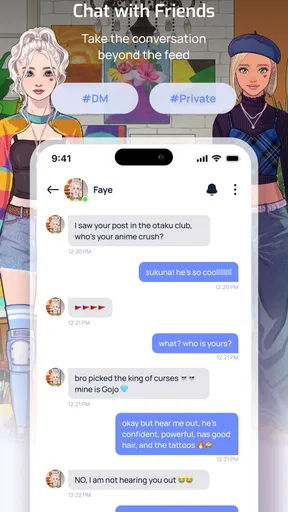
The first successful action should be more deliberate than simply tapping through several profiles. I would look for a conversation where I can add something specific, then respond with a question or a relevant observation. “Hi” is easy to send but gives the other person little to work with. A short message connected to their avatar, topic, or introduction creates a clearer reason to reply.
This is where the app’s voice-and-avatar identity can help. Rather than presenting myself as an empty account, I can make one small choice that establishes a tone: a welcoming greeting, a clear interest, or a playful but understandable introduction. The goal is not to perform a character perfectly. It is to give other people enough context to know how to approach me.
A realistic everyday scenario would be using the app during a short evening break. I might finish setting up my avatar, browse a few active conversations, and choose one discussion that matches an interest I already have. Instead of trying to collect contacts, I would leave one thoughtful response and return later to see whether the exchange develops. That is a healthier measure of success than expecting a busy social life after one session.
If I were helping a friend start, I would suggest three small milestones: finish a profile that feels safe, make one contribution that another person can answer, and decide whether the resulting conversation feels comfortable. This sequence turns an unfamiliar social app into a manageable experiment. It also reveals quickly whether the community’s tone matches the user’s expectations.
Another non-obvious advantage of this approach is that it tests the social design before any customization purchase. If the conversations feel worthwhile with a basic presence, optional avatar-related spending may be easier to evaluate. If the social environment does not feel right, buying more ways to decorate an identity will not solve the underlying mismatch.
Where new users may become confused
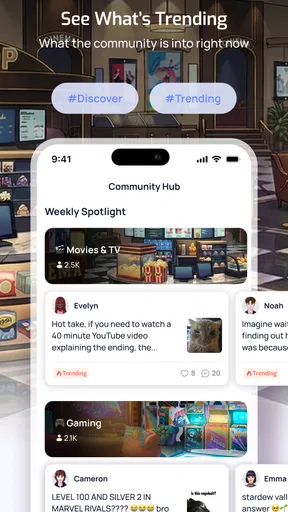
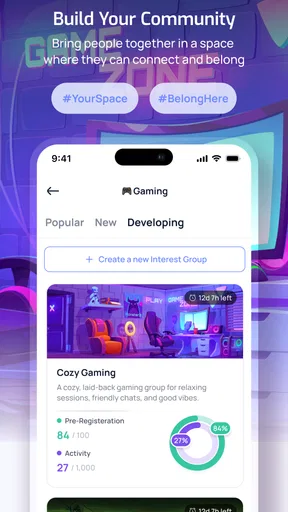
The word “community” can create an expectation that everything will be organized into obvious groups, while “avatars” can suggest a game-like system. I would not assume that the app works exactly like either a traditional forum or a game. The safest approach is to observe how conversations, profiles, and identity choices connect before deciding what each screen is supposed to do.
That matters because a newcomer may spend too much time looking for a familiar feed structure. In a standard social network, the main action is often obvious: post a status, scroll, like, or follow. In an avatar-centered environment, the meaningful action may begin with how a profile is presented and how a conversation is approached. If the first screen feels unclear, I would return to the profile and community context instead of tapping every visible control at random.
I would also avoid assuming that an avatar makes an account anonymous. An avatar changes presentation; it does not remove the need for privacy judgment. I would keep personal details general until I understand who can see them and how conversations work. If someone asks for information that feels too specific, I would decline rather than treating the request as normal simply because the interaction is happening through a digital character.
Another point of friction is the balance between customization and participation. It is easy to spend the first session refining how an account looks and never actually speak to anyone. My recommendation is to set a time limit for profile adjustments, then make one social contribution. A polished identity with no interaction tells me less about the app than a simple profile involved in a genuinely comfortable exchange.
Purchases can create a second kind of confusion. The presence of paid items does not mean a new user must buy something to understand the service. I would use the free experience first, note which options are clearly cosmetic or optional, and avoid purchasing while still learning the interface. For families, I would make that conversation part of setup because the Teen rating and broad price range deserve attention before a younger user explores alone.
The app’s rating of 3.9 is neither a reason to dismiss it nor proof that every user will have a smooth experience. With only a small number of ratings, I would treat it as a signal to test the app personally. My own decision would depend more on whether I can find a suitable social rhythm, understand the profile tools, and feel in control of my interactions.
How it compares with familiar alternatives
Compared with a conventional messaging app, NOVA Community offers a more public and identity-focused starting point. Messaging is better when I already know exactly whom I want to contact. Compared with a large social network, NOVA Community feels more specialized and potentially less crowded, but it cannot automatically provide the same breadth of established contacts and content. Compared with a forum, its avatar emphasis may make profiles feel more personal, while a forum’s topic structure can be clearer for focused questions.
That comparison helps clarify the right use case. I would choose this app for social discovery and expressive identity. I would choose a messenger for dependable one-to-one communication, a forum for detailed topic research, and a major network for reaching a broad existing audience. None of those choices makes NOVA Community bad; they simply serve different starting points.
The trade-off is especially important for users who dislike fragmented online identities. If I already maintain several profiles elsewhere, adding another social persona may feel like work. On the other hand, if my current platforms do not let me express myself comfortably, a separate avatar-based space may feel refreshing because it gives me permission to start with a different tone.
What to do after the first successful exchange
Once I have completed setup and had one worthwhile interaction, I would resist the urge to follow everyone or spend money immediately. I would return to the same conversation, see whether the tone remains respectful, and then explore one adjacent area. This gradual approach makes it easier to identify which parts of the community are genuinely useful and which are merely visually appealing.
A good next step is to refine the profile based on actual feedback. If people misunderstand the avatar or cannot tell what I enjoy discussing, I can make the introduction clearer. If the profile attracts conversations I do not want, I can remove unnecessary details or change the way I present myself. This is more useful than endlessly adjusting colors or appearance without observing how other people respond.
I would also create a personal stopping rule. If I spend several visits browsing without finding a conversation I would willingly continue, I would not force the app into my routine. Social tools work only when the environment feels compatible with the user’s interests and available time. NOVA Community may be a pleasant side community rather than a replacement for every other service.
For users considering purchases, my recommendation is to wait until the app has already delivered a social benefit. If I have found people I enjoy talking with and I understand why a particular item would improve my experience, a small purchase can be considered thoughtfully. If I am buying only because the opening experience feels empty, I would save the money and reassess whether the community itself is right for me.
Version 1.2.3 gives the app a defined starting point, but I would still expect the experience to depend on the people using it and on how the service develops. That makes patience useful. A newer or smaller social space may change in feel as participation grows, so I would judge it over a few intentional visits rather than one rushed session.
My final view is that NOVA Community is worth trying for people who want social interaction shaped by avatars and personal presentation. I like the idea of beginning with a digital identity that can feel expressive without requiring a conventional social profile, and the free entry point makes a cautious trial easy. At the same time, I would not recommend it as a universal replacement for messaging, forums, or the largest social networks.
If you install it, start with privacy-minded profile choices, make one specific contribution, and evaluate the quality of the resulting exchange. That path gives you a meaningful answer quickly without turning setup into a shopping session. For me, the app’s real value appears when the avatar becomes a bridge to conversation rather than a substitute for it.
In short, I would recommend NOVA Community to curious first-time users who enjoy expressive online identities and are comfortable exploring a smaller social environment. I would suggest skipping it if you need instant reach, strictly private communication, or a highly familiar interface. For the right person, it can be an inviting place to experiment with how a voice, an avatar, and a thoughtful first message work together.
Verdict
Strengths of NOVA Community
- Connects NOVA players in one dedicated community space.
- Makes it easier to discover tips, updates, and player discussions.
- Useful for sharing strategies, feedback, and in-game experiences.
- Can help new players find guidance from experienced community members.
- Keeps community conversations separate from the main game interface.
Limitations of NOVA Community
- Content quality depends heavily on how active the community is.
- Discussions may include spoilers, leaks, or unverified information.
- Requires another app or account alongside the main NOVA experience.
- Notifications can become distracting when conversations are very active.
- Community moderation may vary across different topics and discussions.
Other Releases by ENSAPIA Corporation
View All


Similar Picks in This Category
View All
Meta Platforms, Inc.4.6

Instagram4.0

Likee-Live, Chat & Party Games
Likeme Pte. Ltd.4.4

Facebook Lite
Meta Platforms, Inc.4.5

TikTok - Videos, Shop & LIVE
TikTok Pte. Ltd.4.0

Moj: Free Short Drama & Reels
ShareChat4.1
Frequently Asked Questions
What is NOVA Community and what can I do with it?
NOVA Community is a social platform designed to help users connect, communicate, and participate in an online community. Depending on the available features, you may be able to create a profile, publish or view posts, join discussions, share media, and interact with other members. Before downloading, check the current app description because features and supported communities may vary by region or version.
Is NOVA Community free to download and use?
NOVA Community may be available as a free download, but some functions could require registration, in-app purchases, subscriptions, or access provided by a specific organization or community. I recommend reviewing the store listing carefully before installing it, especially the pricing section and subscription terms. Also check whether optional purchases unlock extra tools or simply improve the user experience.
Do I need an account or invitation to use NOVA Community?
Many community-focused applications require users to create an account before they can participate fully. NOVA Community may also limit access to approved members, invited users, or people connected with a particular group, institution, or organization. If you only want to browse, access may be more limited. Confirm the registration requirements and whether email, phone verification, or an invitation is necessary.
What permissions and personal information does NOVA Community request?
As a social or community app, NOVA Community may request access to information such as your name, email address, profile details, notifications, camera, photos, or microphone, depending on the features you use. These permissions should be reviewed during installation and inside your device settings. Read the privacy policy to understand how posts, messages, account data, and activity information are collected and shared.
Is NOVA Community safe and suitable for all users?
NOVA Community’s suitability depends on the people, topics, and moderation standards within the communities you join. Like other social platforms, it may contain user-generated content, private messages, links, or discussions that are not appropriate for everyone. Use a strong password, avoid sharing sensitive personal information, report suspicious behavior, and review the app’s blocking, reporting, and privacy controls before becoming active.
